









Adlice Protect (RogueKiller) is a software whose purpose is to find and remove any virus or malware that may have sneaked onto your PC. The program will allow you to thoroughly scan your system for Trojans, ransomware and any other malware, so you can be completely sure that you don't have any harmful files hidden on your PC. The Premium version of the program will also allow you to establish a permanent protection shield against these threats.
Differences between the Premium and Free Versions
As soon as you install Adlice Protect (RogueKiller) on your PC, you'll be able to start using its Free Version, which will allow you to carry out whole scans of your system for malware. On the other hand, the Premium Version of the program offers many additional features. The most interesting of which is known as Malware Protection, which offers real-time protection against any threat. Thanks to this tool, all malware will stay outside your PC. Another very useful feature included in the Premium version is that you can schedule periodic scans.
A simple and easy-to-use interface
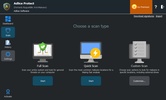
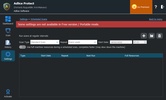
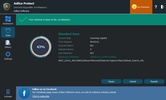
The Adlice Protect (RogueKiller) interface is very intuitive. From the side menu, you can access all the available sections: Dashboard, Scan, History and Settings. From the Dashboard, you can enable and disable Real-time Protection and Ransomware Protection. From the Scan tab, you can carry out quick or exhaustive scans of your PC to look for any threats. In the History tab, you can view the complete history of all virus-related incidents, Trojans or ransomware that you have had. And finally, you can add exceptions and change interface elements in the Settings tab.
Protect entire folders from ransomware
One of the most useful Premium features of Adlice Protect (RogueKiller) can be found in the Settings tab. Thanks to the Protected Storage option, you can define a series of folders within your PC whose content will always be kept in a quarantine state. The program will block any attempt by other software to access or write in the documents inside the directories you have outlined. This feature, however, is only available in the installable version. The Portable version won't allow you to use this or certain other features.
Choose the license that suits you best
As mentioned above, Adlice Protect (RogueKiller) has several versions, each of which can be unlocked using a license. For the free license, you won't need to register or provide your details, and of course, you won't need to pay. The Premium license, on the other hand, is most recommended for users who want to protect their privacy as well as for small companies. And finally, the Technician license is the most suitable option for IT departments of large companies or specialized businesses. Much more information about each type of license can be found on the official website.
The ultimate defense against malware
Download Adlice Protect (RogueKiller) to keep your PC clean at all times. Thanks to this software, which consumes very few resources, you'll be protected against all types of spyware, viruses, Trojans, malware and ransomware. Similarly, the program has many options to help you manage any dangerous file that has reached your PC in the best way possible.


 1 reviews














Comments
There is no Russian language